
How to Report Trademark Infringement on Facebook: A Step-by-Step Guide
Learn how to report trademark infringement on Facebook, what evidence Meta requires, and how to avoid common mistakes that can delay your report.
Facebook gives brands access to a global audience—but it also gives counterfeit sellers, impersonators, and unauthorized businesses an easy way to misuse brand names and logos. A fake Page, misleading advertisement, Marketplace listing, Group post, or profile can confuse customers and damage the reputation that a trademark owner has spent years building.
If your trademark is being misused on Facebook, Meta provides a dedicated reporting process. A successful report, however, requires more than stating that someone has copied your brand. You must identify the relevant trademark rights, point Meta to the exact content, and explain clearly why the use is infringing.
This guide explains how to report trademark infringement on Facebook, what evidence to prepare, and how to avoid the mistakes that commonly delay enforcement.
Important: Only a trademark owner or an authorized representative should submit a trademark infringement report. Do not use the process to resolve unrelated commercial disputes, silence criticism, or target content simply because it mentions a brand.
What Counts as Trademark Infringement on Facebook?
A trademark may be a name, logo, slogan, symbol, or another sign that identifies the source of goods or services. Trademark infringement generally occurs when a third party uses a protected mark without authorization in a way that is likely to confuse people about the source, sponsorship, affiliation, or approval of goods or services.
Examples on Facebook may include:
- A Page using a brand’s name and logo while pretending to be an official business
- A Marketplace listing offering counterfeit products bearing a registered trademark
- An advertisement that falsely suggests sponsorship, authorization, or partnership
- A Group or profile using a protected mark to direct customers to an unauthorized seller
- Posts using a brand identity to collect payments, customer information, or login credentials
Not every mention of a trademark is infringement. Comparative advertising, commentary, criticism, resale of genuine goods, descriptive use, and other forms of lawful use may be permitted depending on the facts and applicable law. Focus the report on unauthorized trademark use that creates a genuine legal basis for confusion or otherwise violates the owner’s rights.
Before You Submit a Facebook Trademark Report
Preparing the evidence first makes the report more precise and reduces the chance that Meta will ask for additional information.
1. Confirm that you are eligible to report
Meta states that a trademark report should be filed by the trademark owner or an authorized representative. If you are acting for a client, company, or other rights holder, be ready to identify your relationship to the owner and provide evidence of authorization if requested.
Useful authorization documents may include a signed power of attorney, letter of authorization, agency appointment, or other document showing that you are permitted to enforce the relevant trademark.
2. Gather the trademark information
Prepare the following details:
- The trademark owner’s full legal name
- The specific word, logo, symbol, or other mark being infringed
- The registration number
- The registration country or jurisdiction
- The goods or services covered by the registration
- A direct link to the registration in an official trademark-office database, where available
- A clear copy of the registration certificate, if needed
Make sure the registration is active and that the owner’s name is consistent across the report and supporting records. If the claim relies on unregistered rights, explain the legal basis and provide evidence showing where, when, and how the mark has been used. The availability and scope of unregistered rights vary by jurisdiction.
3. Preserve evidence of the infringement
Collect evidence before the content is edited, hidden, or deleted. For each item, save:
- The direct Facebook URL
- A full-page or clearly framed screenshot
- The Page, profile, Group, seller, or advertiser name
- The date and time of capture
- Images showing the trademark use
- Product descriptions, prices, contact details, and purchase links
- Evidence of customer confusion, if available
Screenshots are useful supporting evidence, but they do not replace direct URLs. Meta must be able to locate the content on its platform.
4. Identify the correct legal issue
Use the trademark process when the complaint concerns a protected brand identifier. Other problems may require a different reporting route:
| Issue | Usually appropriate route |
|---|---|
| Unauthorized use of a brand name or logo that may cause confusion | Trademark report |
| Fake goods bearing a protected mark | Trademark/counterfeit report |
| Copied photographs, videos, artwork, or written material | Copyright report |
| An account pretending to be a person or business without a trademark claim | Impersonation report |
| Fraud, phishing, or other harmful conduct | Scam or Community Standards report |
One piece of content may raise more than one issue. Keep each report legally focused and use the route that matches the right being enforced.
How to Report Trademark Infringement on Facebook
Step 1: Open Meta’s Trademark Report Form
Use Meta’s official Trademark Report Form. Meta may ask you to sign in before accessing or submitting the form.
Avoid forms or email addresses offered by unknown third-party websites. Starting from the official Meta Help Center reduces the risk of disclosing sensitive ownership documents to an impersonator.
Step 2: State who is submitting the report
Select whether you are:
- The trademark owner, or
- Reporting on behalf of the trademark owner
Enter complete and accurate contact information. If you are an authorized representative, use a professional email address that you actively monitor. Meta may send follow-up questions or its decision to that address.
Meta advises that the rights owner’s name, the reporting party’s email address, and details of the report may be shared with the person who posted the reported content. Use an appropriate business contact rather than a personal address where possible.
Step 3: Identify the trademark owner and the protected mark
Enter the legal name of the rights owner exactly as it appears in the registration record. Identify the mark itself and provide the requested registration information, including the registration number, jurisdiction, and an official database link when available.
If the report concerns a logo, attach or link to a clear representation of the registered design. If several different trademarks are involved, organize the evidence by mark and submit separate reports where the form or facts require it.
Step 4: Add direct links to the infringing content
Provide URLs that lead directly to each allegedly infringing Page, profile, post, advertisement, video, Group, or Marketplace listing. Do not provide only a Facebook homepage, search-results page, screenshot, or general description of where the content can be found.
Where possible, report the specific post, ad, or listing containing the infringing use—not only the account that published it. If the identity of the entire Page or profile is infringing, include the main account URL as well as representative content URLs.
Before submitting, open every URL in a private browser window or another logged-in session to confirm that it resolves to the intended content.
Step 5: Explain how the content infringes the trademark
This is one of the most important parts of the report. Avoid generic statements such as “This Page uses our trademark illegally.” Explain the connection between the protected mark, the reported use, and the likely consumer confusion.
A useful explanation identifies:
- The trademark and the goods or services it protects
- How the reported content uses an identical or confusingly similar sign
- What goods or services the reported party offers
- Why users may wrongly believe the content is official, authorized, sponsored, or affiliated with the owner
- Whether the content promotes counterfeit goods or redirects users to an unauthorized sales channel
Sample infringement description
The rights owner owns the registered [TRADEMARK] mark under Registration No. [NUMBER] in [JURISDICTION], covering [GOODS/SERVICES]. The reported Facebook content uses the identical [TRADEMARK] name and logo without authorization to advertise and sell [PRODUCTS/SERVICES]. The Page presentation, product imagery, and commercial statements are likely to cause users to believe that the seller is operated, approved, or sponsored by the rights owner. No such authorization or affiliation exists. We therefore request review and removal of the identified content for trademark infringement.
Only include statements you can support with evidence. Do not call products counterfeit unless there is a reasonable basis for that conclusion.
Step 6: Review the declarations and sign the report
Meta’s process requires the reporter to confirm, among other things, a good-faith belief that the challenged use is unauthorized and that the information in the report is accurate. The reporter must also confirm ownership or authority to act for the owner and provide an electronic or physical signature.
Read these declarations carefully. A trademark report is a formal legal complaint, not a general moderation request. False or misleading submissions can harm legitimate users, weaken future enforcement, and create legal risk for the reporter.
Step 7: Submit and retain the case information
After submission, save:
- The complete report
- All attachments and evidence
- The submission date
- Meta’s confirmation email
- The report or case number
Use the same email thread and case number when responding to follow-up questions. This helps Meta connect additional information to the existing report.
What Happens After You Submit the Report?
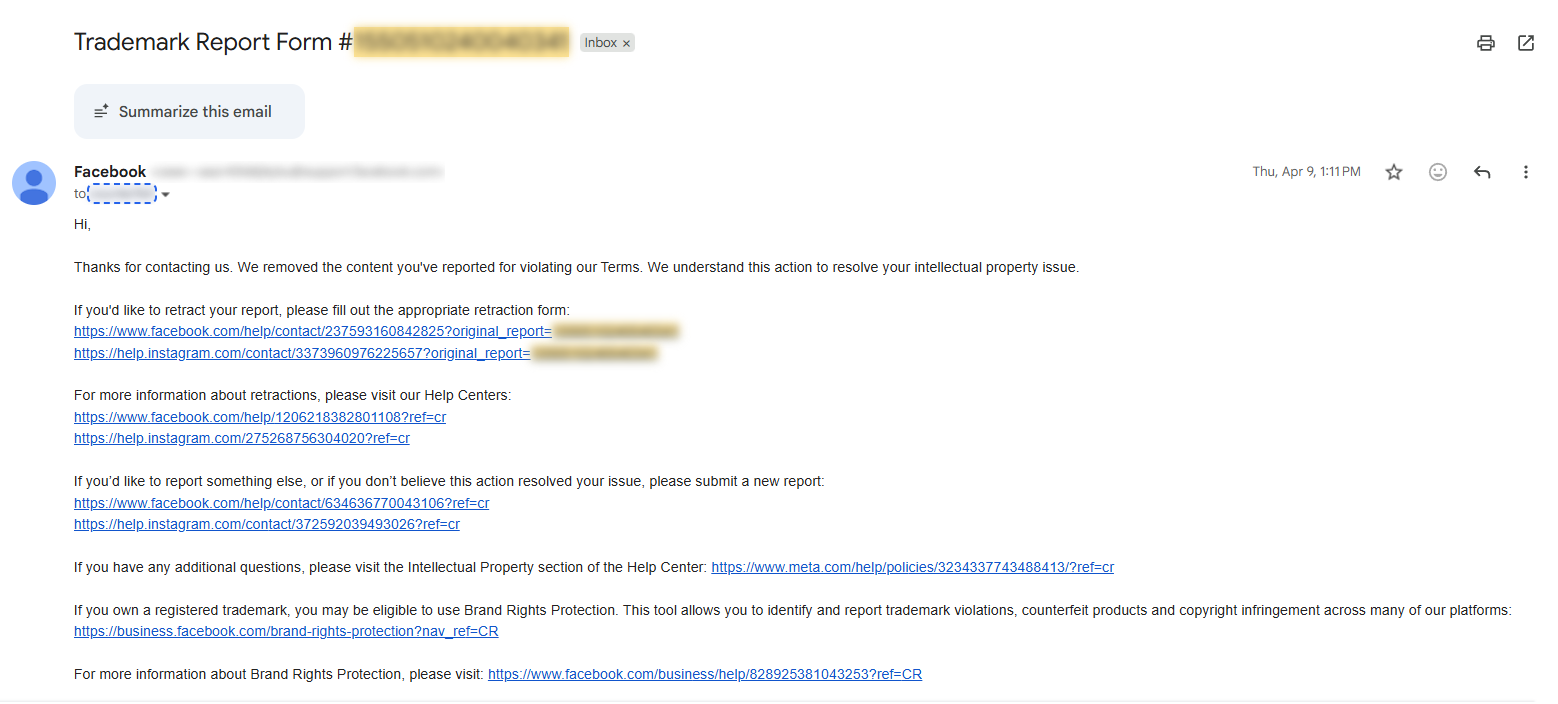
Meta typically sends an email confirming receipt. It may then:
- Request further proof of ownership or authorization
- Ask for clearer or more specific URLs
- Request a more detailed explanation of infringement
- Remove or restrict the reported content
- Decline to take action if the information is incomplete or does not establish infringement
There is no guaranteed review time or outcome. The complexity of the claim, the number of URLs, the quality of the evidence, and whether more information is required can all affect processing.
If Meta removes content, it may notify the affected user and provide information about the report, along with instructions for challenging the decision. Keep the complaint factual and professional because parts of it may be disclosed during that process.
Common Reasons Facebook Trademark Reports Are Delayed or Rejected
The reporter’s authority is unclear
If the person filing is not the registered owner, explain the relationship and provide authorization when requested. A company name in an email signature alone may not establish authority.
The trademark evidence is incomplete
A business registration, domain name, or social media username is not automatically proof of trademark rights. Provide the actual trademark record and ensure the claimed rights are relevant to the reported use.
The URLs are too broad or inaccessible
Meta cannot reliably assess content that cannot be located. Test every URL, avoid duplicates, and identify the exact material at issue. Private Groups and geo-restricted ads may require extra context or supporting evidence.
The explanation does not address confusion
Similarity alone may not establish infringement. Explain why the use is likely to mislead users about origin, authorization, sponsorship, or affiliation, taking into account the goods, services, audience, and presentation.
The wrong reporting channel was used
Trademark, copyright, impersonation, fraud, and defamation are different issues. Submitting a trademark claim for copied photography—or a copyright claim for misuse of a brand name—can delay review.
The report contains unsupported allegations
Overstating the facts can damage credibility. Separate what the evidence proves from what you suspect, and avoid legal conclusions that the available material does not support.
What to Do If Meta Requests More Information
Reply within the original case thread and answer each request in a clear, numbered format. Include the report number in the subject line or opening sentence. Attach only relevant documents and explain what each document establishes.
For example:
- Rights owner: Full legal name of the registered owner
- Reporter’s authority: Relationship to the owner and attached authorization
- Trademark rights: Registration number, jurisdiction, status, and official database link
- Reported content: Direct Facebook URLs
- Infringement: Concise explanation of likely confusion or counterfeit activity
Do not submit multiple identical reports merely because a decision is taking longer than expected. Duplicate complaints can fragment the evidence and make case management more difficult. If Meta declines the report, follow the review or reply instructions in its email and provide material new information where possible.
Using Meta Brand Rights Protection
Eligible rights holders may also apply for Meta’s Brand Rights Protection, a tool designed to help brands identify and report potential trademark, counterfeit, copyright, and impersonation violations across Meta technologies.
The standard trademark form remains important for rights holders who do not have access to Brand Rights Protection. Whichever route is used, accurate rights data, direct URLs, consistent evidence, and a legally focused explanation remain essential.
Build a Repeatable Facebook Enforcement Process
One successful report does not solve an ongoing infringement problem. Brands should maintain a repeatable process for:
- Monitoring Pages, Groups, Marketplace listings, and advertisements
- Preserving time-stamped evidence
- Verifying trademark coverage and authorization documents
- Prioritizing high-risk content, such as counterfeits, phishing, and impersonation
- Tracking report numbers, outcomes, and repeat offenders
- Reviewing rejected reports and improving future submissions
A structured record also helps the rights owner identify patterns, connect related accounts, and measure enforcement results over time.
How Shieldify IP Can Help
Shieldify IP supports trademark owners and authorized representatives with online brand monitoring, evidence preservation, infringement assessment, platform reporting, and case tracking. Our approach is built around accurate rights information, verifiable evidence, and carefully scoped enforcement requests.
If your brand is facing unauthorized use, counterfeit sales, or impersonation on Facebook, contact Shieldify IP to discuss an enforcement strategy tailored to your trademark portfolio and commercial priorities.
Frequently Asked Questions
Can anyone report trademark infringement on Facebook?
No. Meta states that trademark infringement reports should be submitted by the trademark owner or an authorized representative. Other users can report scams, impersonation, or Community Standards violations through the appropriate reporting tools.
Do I need a registered trademark?
A valid registration provides clear evidence of the mark, owner, jurisdiction, and protected goods or services. If you rely on unregistered rights, you should provide a detailed legal basis and supporting evidence. Recognition of those rights depends on the applicable jurisdiction and facts.
Can I report an entire Facebook Page?
Yes, when the Page itself misuses the trademark—for example, by impersonating an official brand. Include the Page URL and direct links to representative infringing posts, listings, or other content whenever possible.
Can I submit screenshots instead of URLs?
Screenshots support the complaint but generally should not replace direct URLs. Meta needs links that identify and locate the content on Facebook.
Will Facebook give my information to the reported user?
Meta advises that it regularly provides the rights owner’s name, the reporting party’s email address, and details of the report to the person who posted the reported content. Use professional contact details and do not include unnecessary personal information.
How long does Meta take to review a trademark report?
Meta does not guarantee a fixed review period. Timing varies based on the report’s complexity, evidence, number of URLs, and whether additional information is required.
What if my content was removed because of an incorrect trademark report?
Use the appeal instructions in Meta’s removal notice or its official trademark appeal process. Explain why the content was misidentified, authorized, non-infringing, or otherwise lawful, and include relevant evidence.
This article provides general information and does not constitute legal advice. Trademark law and available remedies vary by jurisdiction. Facebook and Meta are trademarks of Meta Platforms, Inc. Shieldify IP is not affiliated with or endorsed by Meta.